
From a Repetitive Task to an interactive design tool: My adventure creating a pattern generator
A chronicle of a common design challenge: transforming a tedious, manual process into a digital tool that enhances creativity and saves countless hours of work.
Rafael Molina
8/15/20252 min read
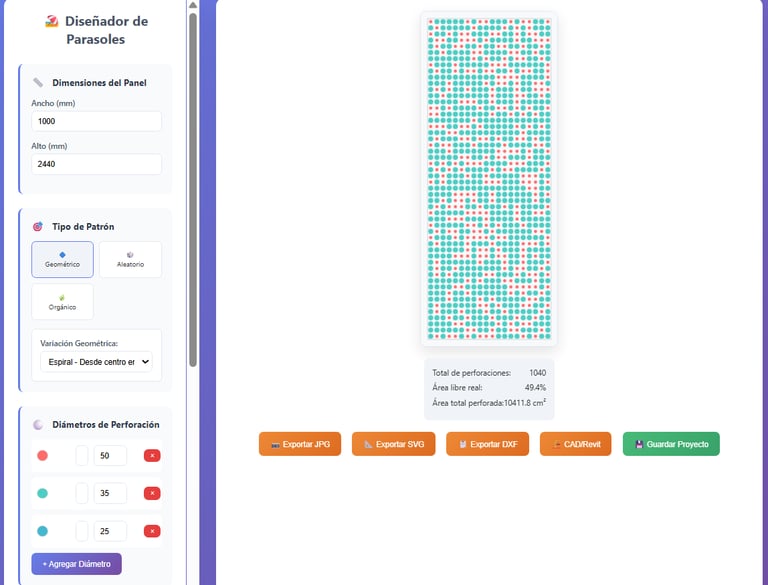
It's happened to all of us in design or architecture: you come across a task that, while creative, involves a heavy load of manual, repetitive work that threatens to consume hours on end. Recently, that was exactly my situation.
The job was to design patterns for a perforated metal sunshade (or brise-soleil). The idea was to explore different options, some geometric and others completely random or organic.
The geometric patterns, with a bit of patience, can be figured out. But the random ones? That's where things got complicated. Creating a random distribution that met a specific perforation percentage, looked aesthetically pleasing, and also allowed for quick iteration... was a real headache. Every change practically meant starting from scratch.
I knew there had to be a smarter way to do it.
The Solution: If the tool doesn't exist, you create it.
Instead of spending days manually moving little circles in a CAD software, I decided to invest that time in something more productive: creating my own tool. With the help of some AI as a co-pilot for the coding part (I confess I'm not a programmer), I began to shape a small web application.
The goal was simple: to create an interface where anyone could design and visualize perforated sheet patterns quickly and interactively.
Introducing the Pattern Generator
The result is this small but powerful webpage that solved my problem. And honestly, I'm quite happy with how it turned out. The tool allows you to have full control over the design, with features like:
Custom Dimensions: You can set the width and height of the panel to fit your project.
Diameter Sets: A single perforation size? Or a mix of several? You choose the diameters, and the tool distributes them.
Open Area Control: The key part. You tell it what percentage of the sheet you want to be perforated (for example, 40%), and the program calculates the number of perforations needed to achieve it. Goodbye to manual calculations!
Pattern Library: It includes several preset patterns (geometric, organic) and, the crown jewel, the Random mode, which generates a new option with every click.
Design Seeds: Did you like a random pattern you generated? Don't lose it! Each design has a "seed" (a unique code) that you can save to regenerate it exactly the same way in the future.
Export: Once you have the design you like, you can export it in useful formats to continue working in other programs.
Let's get to it! Here's how it works:
To better explain what I'm talking about, nothing beats a video. Here's a quick tour of the interface and its features.
Beyond the Perforations: A Final Thought
This small personal project reminded me of the power we have as designers when we combine our vision with the right technological tools. What began as an obstacle in a daily task transformed into a solution that not only saved me a huge amount of time but also opened up a range of creative possibilities that were previously unfeasible.
It's proof that sometimes, the best way to solve a problem is to stop, step back, and build your own door.
And what do you think? Do you see other applications for a tool like this? I'd love to read your ideas and comments below!
